Your whole gaming club on one screen

Software for computer clubs in Uzbekistan: sessions, members, the bar, shifts and reports at the desk, and a customer screen on every PC.

  • 14-day free trial with every feature
  • One-time payment, no subscription
  • Runs on your own server, without internet
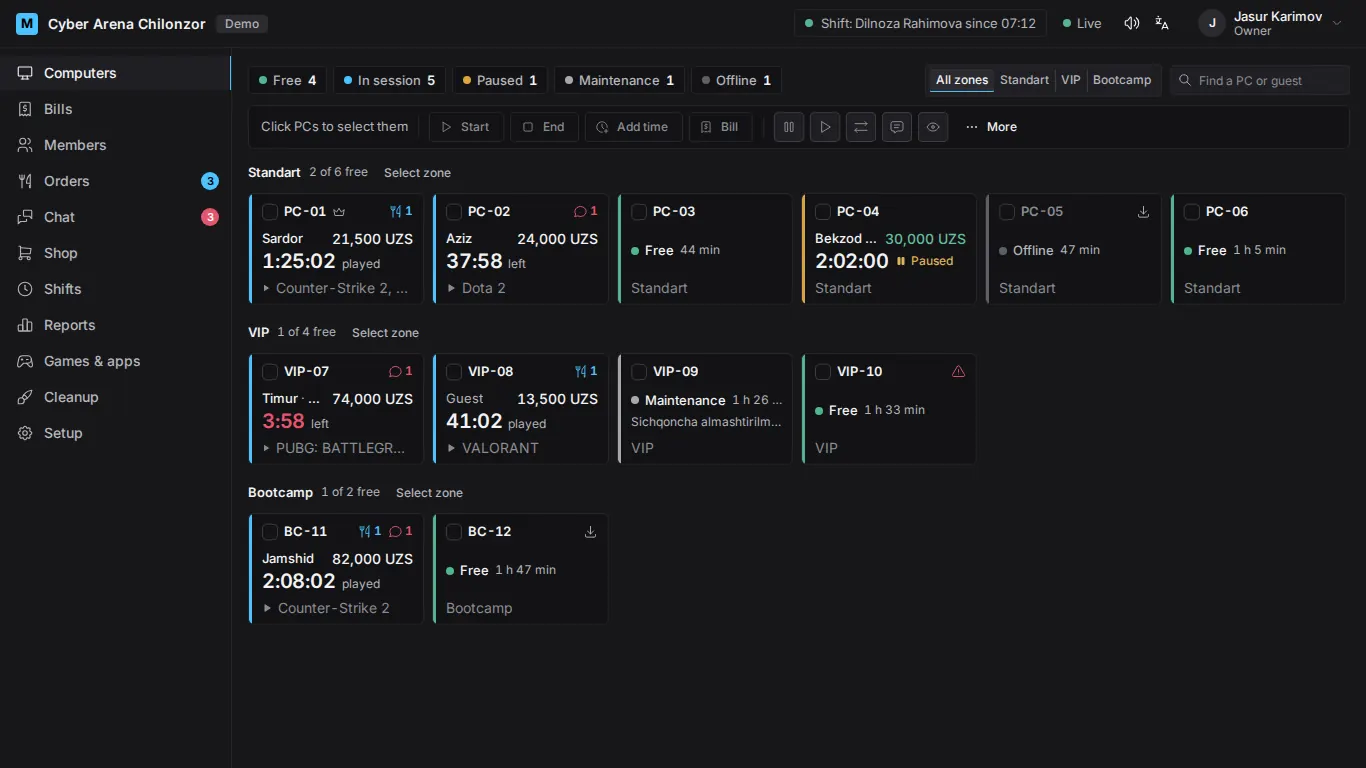
Admin panel: the map of the club's PCs with each one's state, time and amount

Run a PC yourself

This is the PC map from the front desk, and it works. Pick a PC, start a session, add a drink and end it: the bill adds up the way it does at the club.

Cyber Arena ChilonzorStandart · 3 free

Bill · PC-03

The PC is free. Choose the time and press Start.

Customer
Time
Start a session
Add time
Coca-Cola 0.5 l
0
Pause
End the session
See every feature

The live example needs JavaScript. Every feature is described below.

The prices are an example; every club sets its own tariffs.

Everything the club needs

Fast for the admin at the desk, and the owner sees where every so'm went.

  • Every PC on one screen: who is playing, how much time is left and what they owe.

    • Timed, open-ended and package sessions
    • Pause, add time, move to another PC
    • Tariffs per zone, prices by time of day
    • The PC cleans up and locks after each session
  • Customers get a screen they already know, on the club's own picture, in four languages.

    • One screen: game covers on the club's picture, the time and the bill in a side column, the shop and the chat in windows
    • Alt+Tab, open apps, tray icons, keyboard layout and volume
    • Game covers from Steam, and a member's favourites on any PC
    • When time is up, the game stays open while the customer pays
  • Regular customers sign in on the lock screen with their phone number and password, and play on a prepaid balance.

    • Top-ups in cash, by card or transfer
    • Groups with discounts that grow with total spend
    • Credit (“nasiya”) for trusted members
    • A members-only mode for the club
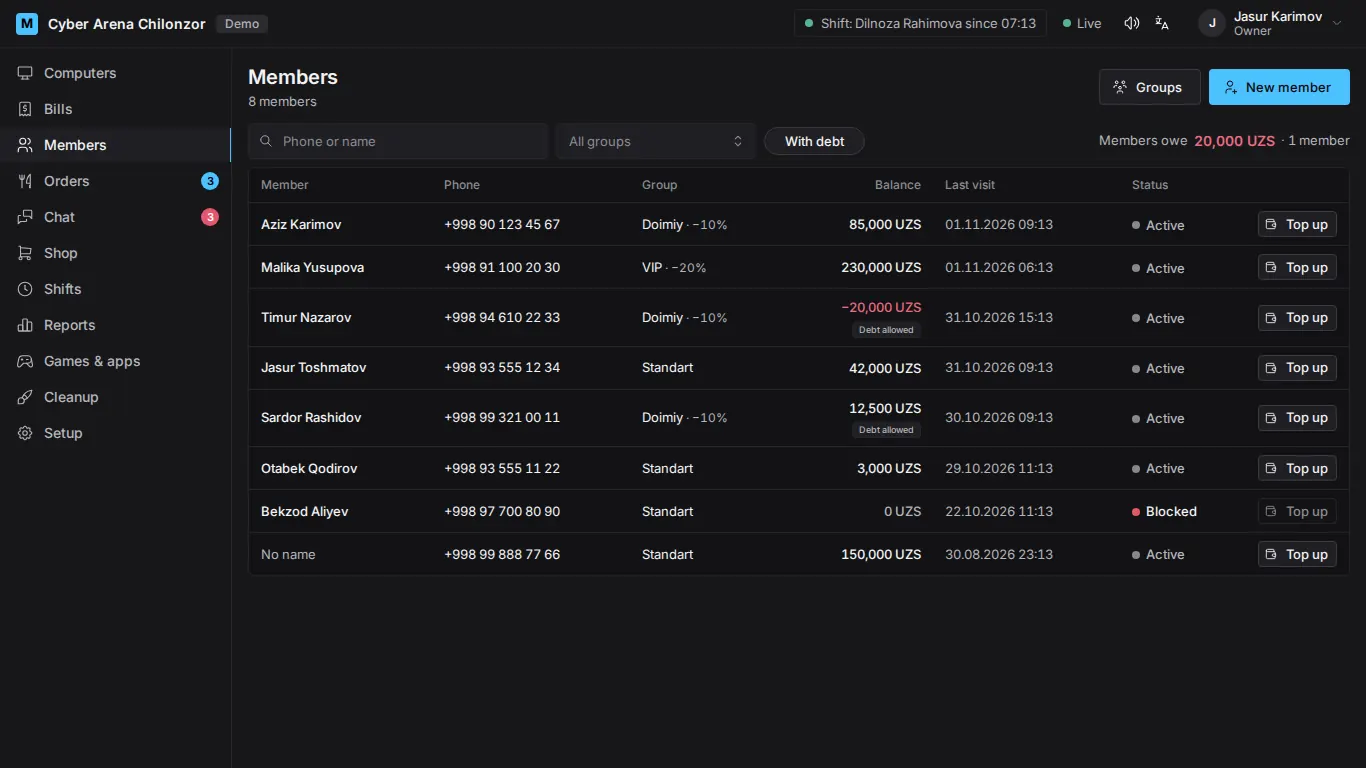
    Members list: phone, group, balance and last visit
  • Drinks and snacks sold at the counter, or ordered from the customer's PC straight onto the session bill.

    • Stock, receiving, write-offs and stock counts
    • Chat with customers
    • A “Call the admin” button on every PC
  • Bills and payments in cash, by card or transfer, and shifts that open and close with a cash count.

    • A shortfall or surplus shows at once
    • Reports for today and any period, Excel and CSV
    • Busy hours by weekday
    • Every money action in the audit log
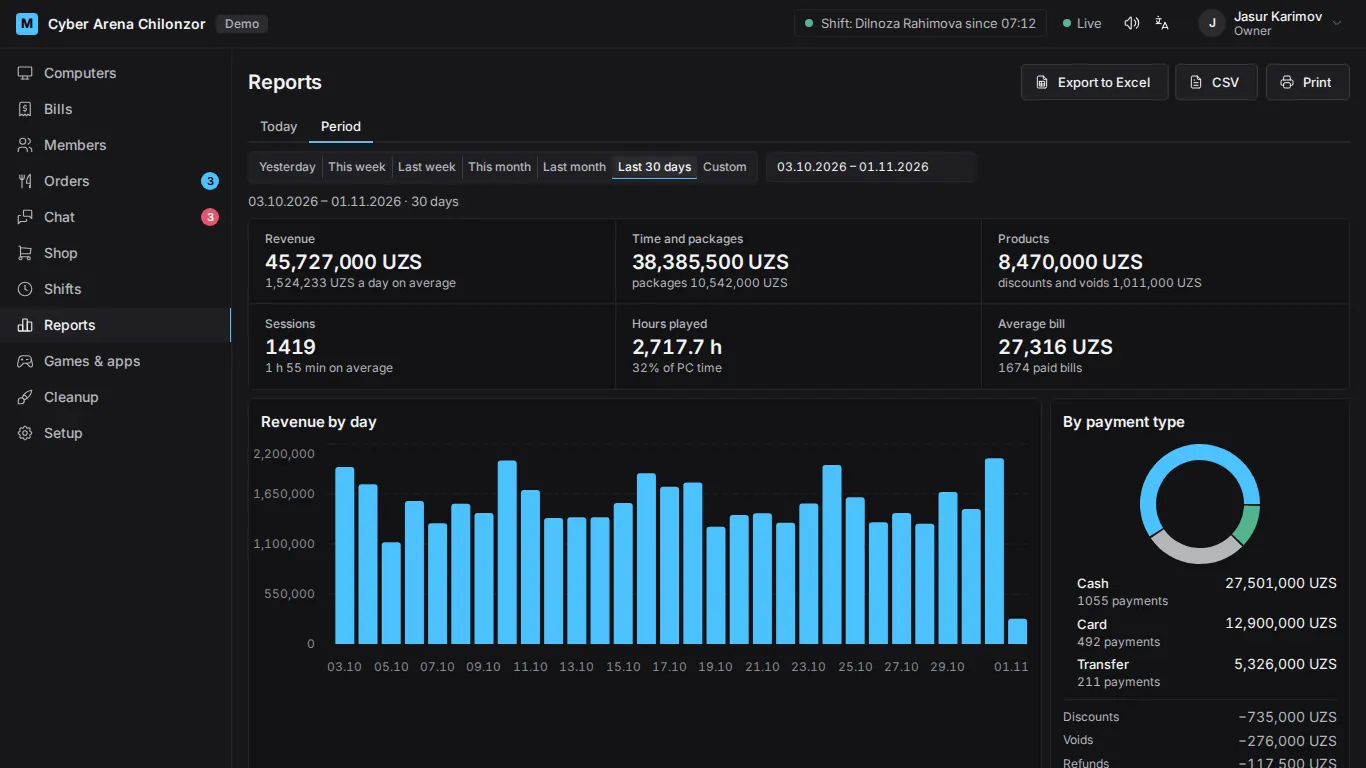
    Report: revenue by day and by payment type
  • Watch a customer's screen live and take control when needed. The customer always sees a notice while you do.

    • Remote installs of programs, restart and shut down PCs
    • Every view is recorded in the audit log
    • Update a game on one master PC, and the others get it over the local network
    • Optional diskless mode with the open-source Broom diskless server
  • The admin panel speaks Uzbek (Latin and Cyrillic), Russian and English. Each staff member picks their own.

    • The customer screen has the same four languages, and customers switch it themselves.

What the customer sees

Every PC shows the club's own picture and its number. The customer signs in, plays, and sees the time left and the bill all along.

Locked PC: a big number 7 over the club's picture
Between sessions PC 7 is locked and waits for the next customer.
The screen after a member signs in: the name, the balance and the Start button
A member signs in with a phone number and sees the balance and the rate.
Customer screen: the game covers, the column with the time and the bill, and the taskbar
During the session: the games, the time left and the bill, orders and chat.

The screenshots show demo data.

A server in the club, an agent on every PC

No special hardware and no cloud: the club's own PCs and local network are enough.

  1. Install the server at the desk.

    Run the server setup on the front-desk PC. The admin panel opens in a browser, where you enter the club name, tariffs and staff.

  2. Then put the agent on every PC.

    Run the agent setup on each gaming PC, or on many at once with one command. Each agent finds the server on the local network by itself.

  3. Approve each PC by its code.

    Each PC shows a pairing code. Check it in the panel and give the PC a name and a zone.

  4. Open a shift and start playing.

    Count the cash, open the first shift and start sessions. The trial has every feature.

Requirements

  • Server: Windows 10 or 11, on while the club is open.
  • Gaming PCs: Windows 10 or 11 Pro, 64-bit.
  • All PCs on the same local network.

Pay once, use it for good

No subscription and no fee per PC. Try every feature free for 14 days, then buy the license once.

Forever license

$1000 one-time payment

Limited-time offer: the license for every PC in your club, with one year of new versions. After that your version keeps working forever.

  • Unlimited PCs
  • Every feature
  • One year of new versions included
  • After that, your version keeps working forever
  • Renewing updates is optional
  • Free re-issue if you replace the server PC
Buy the license

Free trial

14 days Before you buy

Install it in your club and use every feature on any number of PCs. No payment needed.

  • Every feature, any number of PCs
  • When it ends, running sessions, bills and reports keep working
  • Activate the license with a key, no reinstall
Start the free trial

The license is activated online with a key in a minute; a server without internet gets it as a file. Payment and delivery of the key: see the terms of sale.

Questions

Did not find the answer? Ask us.

Ask a question

How much does it cost?

During the limited-time offer the forever license costs $1000, paid once. It covers any number of PCs and every feature, and includes the new versions released within a year.

What happens after the year of updates?

Nothing stops: the club keeps using the version it has, forever. Renewing updates is optional; write to us when you want newer versions.

Can I try it before buying?

Yes. After installation every feature works free for 14 days. When the trial ends, new sessions and new PCs need a license; running sessions, bills, shifts and reports keep working.

Do I need internet?

Not for daily work: the server and the PCs work over the local network. Internet is needed once, to activate the license with a key. If the server has no internet, we send the license as a file.

What PCs do I need?

For the server, any PC with Windows 10 or 11 that is on while the club is open, for example the front-desk PC. Gaming PCs need Windows 10 or 11 Pro, 64-bit. All PCs must be on the same local network.

What if I replace the server PC?

The license is tied to the server. If you replace the PC or reinstall Windows, write to us and we re-issue the license for the new server free of charge. The club's data comes back from a backup.

How are updates installed?

Not automatically: you install a new version yourself when it suits you. Data, settings and paired PCs are kept.

Are there online payments or fiscal receipts?

No. Payments are recorded as cash, card or transfer, and receipts can be printed, but they are not fiscal receipts. There is no online payment or fiscal (tax) module.

Does it work in a diskless club?

Yes, there is an optional diskless mode. It works with the open-source Broom diskless server.

Where is the data kept?

On the server PC in your club. Members' phone numbers, sessions and payments are not sent to us. The server makes a backup every night; copy the backups to another disk or a USB stick now and then.

Try it in your club

Ask for the free trial, a demo or the license. Leave your name and phone number and we will contact you.

  • 14-day free trial with every feature
  • One-time payment, no subscription
  • Runs on your own server, without internet

Thank you! We have your request and will contact you soon.